
Qimage
Ultimate 2018-125
Software information
License:
Time-limited trial (Free to try)
Updated:
24 Sep 2018
Software Screenshots
Size: 10.89 MB
Downloads: 9804
Platform: Windows (All Versions)

Anyone who values ease of use and powerful functionality is very well advised to get the Qimage Ultimate application developed by ddisoftware. Especially designed to provide top quality printing functionality, this application makes it incredibly easy to print out images. The functionality Qimage Ultimate has to offer will satisfy all users, from casual to professional photographers.
To get started with Qimage Ultimate, you will have to download a 7.5MB executable, run it, then click through the setup wizard that shows up. Going through this setup wizard is a simple matter; you will have no problems getting Qimage Ultimate up and running. It must be mentioned here that the Qimage Lite, Professional and Studio versions have been retired. If you want to upgrade from one of these versions to Qimage Ultimate, you can easily do so without affecting your existing Qimage installation.
The Qimage Ultimate, which has been purposely built for photo printing, can be customized with skins. By default, the application uses the Chrome 2011 skin. Go to Edit -> Preferences -> Skins and you can activate one of several other skins.
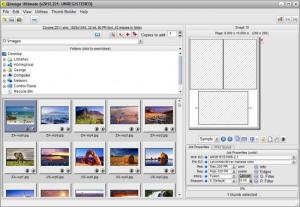
The application’s interface is divided into several panes. The one in the upper left hand side lets you browse your drives and locate images. Select a folder with images in it, and thumbnails of those images will be presented in the pane in the lower left hand corner. The right hand side is reserved for letting you start and adjust a print job.
As mentioned above, Qimage Ultimate is a photo printing tool that puts the emphasis on quality. With this application by your side, you will be able to easily print out images. When you first launch the application, you will be invited to read a “Getting Familiar with Qimage Ultimate” guide – you’re well advised to go through it and familiarize yourself with the functionality this tool has to offer.
Speaking about functionality, Qimage Ultimate can do a few other things besides printing out images. You can also use it to rate images, edit images, create photo albums, and send images out via email.
You can evaluate all the functionality that Qimage Ultimate has to offer for free for a trial period of 14 days.
Qimage Ultimate offers powerful printing functionality that puts the emphasis on quality, but without forgetting about ease of use.
Pros
Change how the interface looks by using skins; the interface was built specifically for photo printing. Print out, edit, and email images. There’s a handy “Getting Familiar with Qimage Ultimate” guide that you can check out.

Cons
Free to use for 14 days; nag screen.

Qimage
Ultimate 2018-125
Download
Qimage Awards

Qimage Editor’s Review Rating
Qimage has been reviewed by George Norman on 25 Sep 2012. Based on the user interface, features and complexity, Findmysoft has rated Qimage 4 out of 5 stars, naming it Excellent







